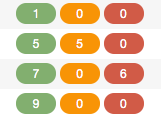
A guide to interpreting the status icons in TerminalFour
Key to section status icons
| Icon | Status Description |
|---|---|
| Approved, shown in navigation | |
| Active, not shown in navigation | |
| Pending, shown in navigation | |
| Pending, not shown in navigation | |
| Inactive (deleted), shown in navigation | |
| Inactive (deleted), not shown in navigation | |
| Archived, Approved | |
| Archived, Pending | |
| Archived, Inactive |
Content status is indicated by color codes: green (approved), orange (pending), and red (inactive/deleted)